Chat Beta

Showing posts with label JMeter. Show all posts

8/03/2013

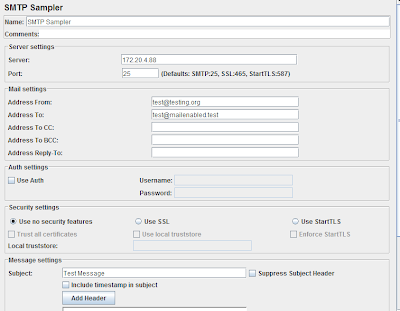
Generating a load of e-mails using JMeter (SMTP requests with MailEnable e-mail server)

Last week, in my project I had a requirement to generate a large number of e-mails to test a scenario. I was wondering what tool or method(whether to write a batch process, or use any outlook tweak for this) I can use for this and just clicked that JMeter can be used for this purpose.

I use "MailEnable" free version (http://www.mailenable.com/standard_edition.asp) as my e-mail server for my testing purposes along with Exchange. 

JMeter is a wonderful tool that it gives number of different samplers out of the box that can be used for sending requests. So I used SMTP request for this purpose.

Just fill up Server,Port, From and To address and a subject to the email. It works like a charm with MailEnable.

Its a simple way to create load of e-mails.


4/19/2013

Amazon cloud instances (EC2) as performance test load generators

Recently I was given a task of executing a performance test for one of our customer's applications.

Test was simple. It was primarily to test a "Maps download" scenario (each file size to be around 30 MB). A dedicated Maps generating/downloading server is there to cater to the need and our task was to find out how well the server responds to the user need.

JMeter (2.9) was used for this test and it was ideal for the scenario.

Creating valid/ realistic user load

Doing some calculations/statistical analysis, we estimated a figure for "Downloads/Hour". Our test was around assessing the performance for the above.

Load Generation

For the purpose of load generation, we decided to go for a cloud solution, and we choose Amazon AWS services, after doing some researches using its "Free tier" provision.

Some reasons why we go for a Cloud solution

1. The hosting Map server is on the Internet - We, as test team is located far away geographically as opposed to the real uses who are using it. So we needed to perform the test as close as possible . Amazon gives the flexibility of choosing a closer location because their data centers are located all over. (Or at least in our case they had regions which we wanted)

2. We wanted to test the application at "last mile" as opposed to "First mile" because, no body knows what's beyong your firewall. You need to try out your entire delivery chain including your ISPs, 3rd party applications like CDN, Ad servers, other web services that your application consumes which are basically beyond your control.

3. We were afraid to do it using our internal network since it could generate heavy traffic inside which could have an impact on the rest. (Still we do not have a separated test lab for this purpose)

4. Since we do not have an internal test lab in place, there was an issue in finding right hardware to generate the anticipated load for the test.

Support from Amazon  

I was impressed by the support given by Amazon team (Support service) for some account related issues I had initially. It was prompt and useful.

Using EC2 Instances

For the test we used "On-demand" extra-large standard instances having 8 compute units (4 cores) and 15 Gig RAM. The IO performance relatively OK, having intermittent lagging.

Standard Instances comes with 30 Gig Hard disk and the operating system consumes 75% if it (It was Windows OS) and left over with 7GB usable. So had to add a new volume using the Management console and attach it to the instance. After restarting the instance, you will see a new partition being added in My computer.


Distributed Load testing using JMeter - Problem using EC2 instances

JMeter can make use of several load generators to empower its load generating capability. But, it is required that all the load generators need to hook to the same network in order to communicate among them. You might experience that your started instances belong to different subnets and thus  cannot ping to each other.

To solve this issue, we can create- VPC or Virtual Private Could in the Amazon cloud. I used to have a VPC having "VPC with a single public subnet only" configuration, and it serves the purpose.


Once you use a VPC, you can start-up instances inside this VPC so that they will be assigned IP addresses in the same subnet fulfilling our requirement. Also in order to communicate these instances with the Internet, you will have to allocate some ELASTIC IPs, and associate them to the instances.

3/06/2013

Generate and Personalize a Html Report for JMeter with Ant


One of the easiest ways to generate a report out of JMeter test run is to make use of "extra" folder comes with JMeter and build with Ant

Steps to create an Ant report

1. Download Apache Ant and update user variable 'Path" pointing to the Ant installation 

2. Go to %jMeter_Installation%/extras folder, and then copy your .jmx (JMeter script) file there 
3. Using CMD prompt, run following command : jmeter -n -t test.jmx -l test.jmx.jtl to run the Jmeter script and then create the .jtl results file
4. Then run ant -Dtest=test.jmx to create the Ant report
with –Dtest switch, you point to your Jmeter script file 


If it is successful, you will get a html file created with the result (ex: test.jmx.html)

%jMeter_Installation%/extras contains necessary artifacts to run ant and generate the report. 
In build.xml, you can change the source and destination file locations if you want

make sure test.jmx.jtl file is there. Run jmeter in command line: jmeter -n –t test.jmx -l test.jmx.jtl to generate the .jtl file

If you get an error "Fatal Error! Content is not allowed in prolog." it could probbly be due to CSV format of your .jtl file, and for successful XSLT transformation it needs to be XML. 
To fix this add the following line to user.properties file (lives under /bin folder of your ${jmeter-home}

 jmeter.save.saveservice.output_format=xml

To automate the process , create a .bat file and schedule it in Task scheduler.Add following to the batch file.
del test.jmx.jtl (always delete the existing .jtl file before a new test run)
jmeter -n -t sod.jmx -l test.jmx.jtl
ant -Dtest=test.jmx

host the test.jmx.html in web server


2/22/2013

Basic JMeter functions useful in scripting

This is a small presentation to illustrate some of the basic JMeter functions/ features that can be used to accurately construct JMeter scripts

10/25/2011

JMeter as a Performance testing tool

One of the free and opensource web performance testing tools that we use in the industry is JMeter. It has been the only choice when we think about the ridiculous prices of some proprietary load test tools that are available in the market
Anyway we have been facing some issues working with JMeter earlier, mainly
  • Record/ Capture scripts
  • Lack of reporting/analysis capabilities
JMeter was not as good as a commercial tool when it comes to recording scripts. Its quite tiresome to setup to recording mode(using proxies) and if you try to do it manually, Its a nightmare.

Also Listeners that are shipped with JMeter as not as friendly as those that of commercial tools and gives less opportunity to dig down in to real performance parameters.
I was recently amazed to see that those gaps have been filled to a great extent due to the introduction of some 3rd party components that can be used along with Jmeter latest release version. Thanks for the generosity of the Internet community

Badboy 2.1.11(http://www.badboy.com.au/)- This is a free web record and playback functinal and load testing tool that can be used to generate necessary .jmx scripts that can be used in JMeter. It has the option to export the badboy script to .jmx script.

There is an compatibility issue if you use JMeter 2.5 where if you export a .jmx file from Badboy 2.1.11 and opening in JMeter 2.5 you get an error. A workaround for that is you might need to use a lower version of JMeter(2.3.4) , import the .jmx script which was exported by Badboy and save it as a test plan and reopen it with JMeter 2.5.

Listeners/reporting has been reinforced with the introduction of some plugins to JMeter. You can download this plugin from http://code.google.com/p/jmeter-plugins/.
Just download this .zip file and extract it. Then copy JMeterPlugins.jar file to jakarta-jmeter-2.5\lib\ext. Make sure you have Java JDK 1.6 or above is installed.  It has some nice performance parameters introduced like
  • Perfmon matrix collection(SUT)
  • Hits per second
  • Response times Vs Threads
You can get the whole bunch of the new additions by visiting their site
    Thanks again for all contributors!

    Some of the graphs and Tread models of this new plug-in are shown below